
Create walllet
Making a self-custodial crypto wallet feel like opening a bank account
- Product
-
 walllet.com
- Role
- Product Designer
- Industry
- Crypto, Web3
- Year
- 2023-2024
TL;DR
walllet.com is a fully self-custodial crypto wallet. No seed phrases. Passkeys instead. I designed the entire creation and login flow as the founding product designer in 2023, when almost nobody had done this. The flow hit 73% onboarding completion against a ~38% industry benchmark for seed phrase wallets. Median time to create a wallet: 47 seconds.
Crypto onboarding problem
Crypto onboarding has a problem the industry kept calling a user education problem
Seed phrases are hard to manage safely. The stakes are irreversible and the interface is just a list of words on a screen you're supposed to store somewhere forever. Most people who try a non-custodial wallet for the first time quit at that step and don't come back. The standard industry response was more tooltips. Nobody really questioned whether asking users to manage a seed phrase was the right call at all.
walllet uses a smart wallet architecture (ERC-4337). The seed phrase exists at the protocol level but lives in the device's secure enclave, managed by iCloud Keychain or Google Password Manager. You never see it. walllet's servers never touch it. Still fully self-custodial. It just doesn't look like what people expect self-custody to look like.

The first user who tested the prototype asked:
"okay but where's my seed phrase?"
That question shaped everything that came after.
Before touching Figma, I audited 8 crypto wallets and 4 FinTech onboarding flows.
MetaMask, Phantom, Coinbase Wallet, Rainbow, Argent on the crypto side.
Revolut, Wise, Cash App, Monzo for the FinTech reference.
The gap was obvious. FinTech: enter email, verify, done. Crypto: a lecture, then homework involving 12 words you have to write down and never lose.
The audit confirmed something I'd already suspected. Crypto users weren't just using a product. They'd been trained by years of "not your keys, not your coins" to treat a visible seed phrase as proof of ownership. No seed phrase meant custodial. That's not irrational. It was the correct read of every crypto product that existed before this one.
Getting past that wasn't a copy problem. I had to communicate ownership without the artifact users expected to see as proof of it.
Okay but where's my seed phrase?
First user prototype test, 2024
Three decisions that defined the flow, each with an easier wrong answer
No seed phrase option in v1, not even for advanced users. The obvious call was to offer both: passkey for mainstream users, seed phrase for crypto-native users who wanted it. I cut that. Two paths create doubt, not flexibility. If there's a "see seed phrase" button, crypto-native users click it, feel responsible for managing it, and we've rebuilt the exact problem. Passkey was the only creation path. Private key export was a real power user need and we built it, but in the iteration after launch, once users had enough time with the passkey model to understand what they were exporting.
THE OWNERSHIP SCREEN
After passkey setup, one screen appeared before the wallet home. It said: "Your wallet lives on your device, secured by your passkey. walllet doesn't have your keys. Only you do." No ERC-4337. No technical explanation. Just a plain statement of fact. I went through eleven versions of this copy. The early ones were too technical. The middle ones sounded defensive, which somehow felt worse. The final version worked because it didn't try to explain anything. It just said what was true.
Recovery framed as access, not backup. Three ways to get into your wallet: passkey on your device, email, or phone number. Most crypto wallets call this "recovery methods," which immediately primes you to think something went wrong. I called it "how you access your wallet" and presented all three the same way, same language, no hierarchy, no warning labels. The word "recovery" never appears in the flow. You're not setting up a backup. You're choosing how to log in.
CHOSE | CUT | BECAUSE |
|---|---|---|
Passkey as the only wallet creation path | Passkey + seed phrase (user's choice) | Two paths create doubt. Crypto-native users would default to seed phrases, rebuilding the problem. One path forced clarity. |
Ownership screen as a mandatory onboarding step | Optional "how it works" tap after signup | When optional, 69% of users skipped it and later asked support if walllet was custodial. Mandatory reduced those queries by 68%. |
"How you access your wallet" framing for all three login methods | "Recovery methods" with a primary and two backups | Backup framing primes anxiety. Access framing makes email and phone feel like normal login options, not emergency levers. |
Private key export deferred to v2 | Private key export in v1 for power users | An export option in v1 would have contradicted the ownership screen. Users needed time with the passkey model before being offered the option to bypass it. |
What the flow actually looked like
Five steps. Every one borrowed from FinTech, not crypto.
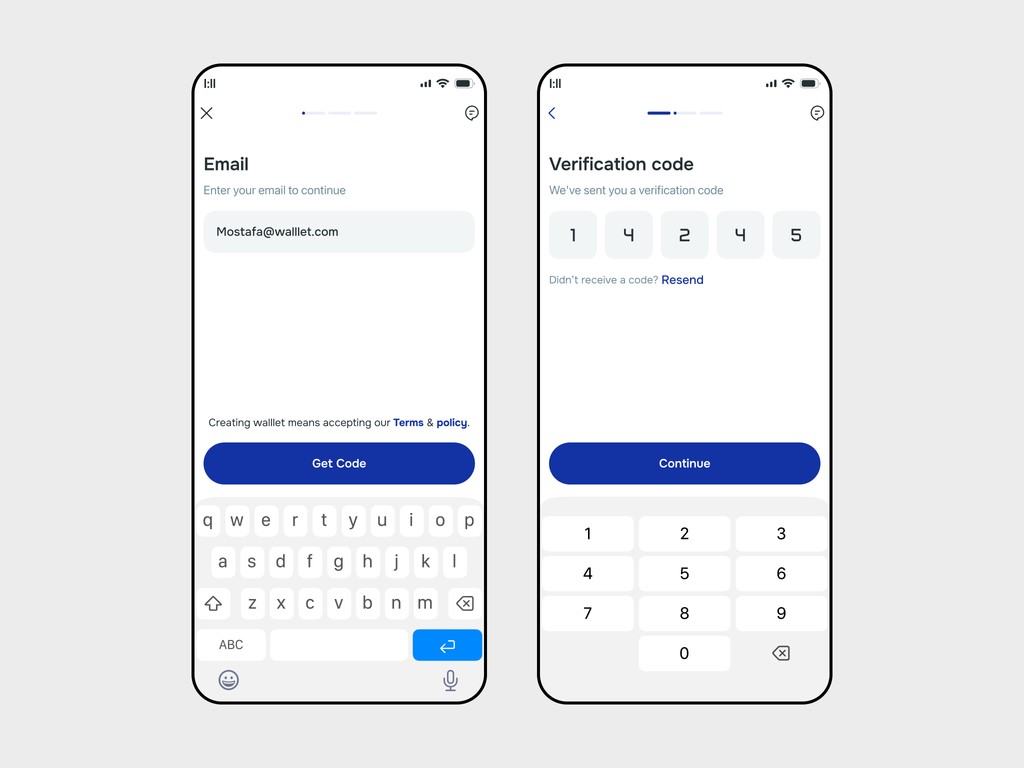
Enter your email
Not "create a wallet." Not "set up a seed phrase." Just an email field, same as any account creation. The word "wallet" was in the product name, not the verb.
Verify with a code
Six-digit code to email. The same pattern every banking app uses. No new behavior to learn.
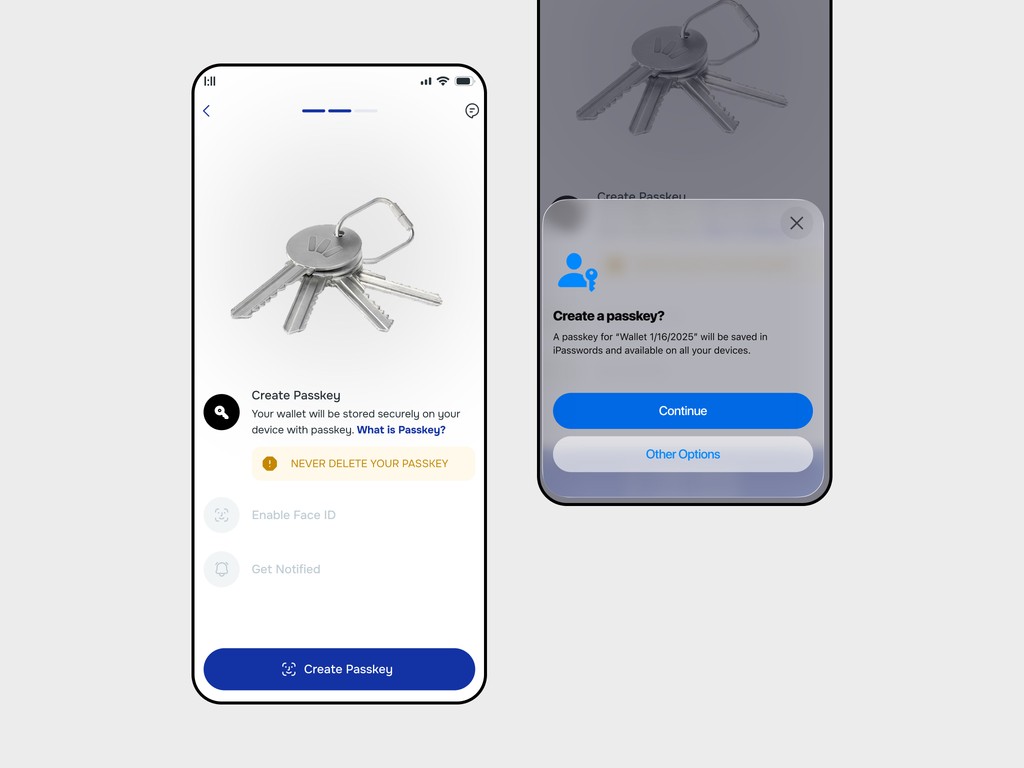
Set up your passkey
Face ID or fingerprint. One tap. The prompt used device-native language: "Use Face ID to secure your wallet." No explanation of what a passkey is. The device already knows. Users already trust this gesture because they use it for Apple Pay.
Your wallet, your keys
The ownership screen. Single card, plain language, no technical terms. This was mandatory. Not a tooltip, not a skip option. Thirty seconds to read. Then a button that said "Got it, take me in."
Add a backup access method
Phone number, prompted as "another way to access your wallet." Optional but recommended. Framed identically to how Google prompts a recovery phone for Gmail. Familiar enough that most users just added it without thinking twice.
The login screen said "Log in" and had an email field. That was the whole design argument. No crypto vocabulary in sight.
Returning login was the same logic. Email, code or passkey, straight home. Someone who lost their phone and needed back in saw: "Enter your email to access your wallet." Same screen as a normal login from a new device. Recovery and login were the same flow on purpose.

What happened after launch?
73%Onboarding completion rate (industry benchmark ~38%) | 47sMedian time from first tap to created wallet | 31%Users who opened "how it works" in their first session | 68%Drop in "is this custodial?" support queries after mandatory ownership screen |
The 68% drop in custodial support queries is the one I'm most proud of, and it came from fixing a mistake. The ownership screen started as an optional "how it works" tap after account creation. About a third of users found it. The rest were the people filing support tickets asking if walllet held their keys. Moving it into the mandatory flow, as a single card between passkey setup and the wallet home, fixed it fast. The information was always there. People just needed to see it, not find it.
The 47-second median surprised everyone. A comparable passkey wallet we'd benchmarked averaged about 3 minutes. The gap came from moving all the education out of the critical path. You learn about self-custody after you're inside your wallet, not before.
What I'd do differently!
The ownership screen should have been mandatory from day one. I knew the "where's my seed phrase?" question was coming. I'd seen it in prototype testing. I made it optional anyway because I didn't want to add steps to the critical path. Wrong call. Reading one screen takes 30 seconds and it's the only thing that answers the most predictable question in the flow. I treated trust as supplementary content when it was actually part of the product.
In crypto, simplicity feels suspicious to anyone who's been told complexity is what keeps their money safe. Making something easy isn't enough. You have to make the ease feel intentional, not like something's being hidden. I didn't fully get that until I saw the support tickets.
FAQ
How does walllet.com keep the wallet self-custodial without a seed phrase?
The seed phrase exists at the protocol level but lives in the device's secure enclave, managed by iCloud Keychain or Google Password Manager. walllet's servers never see it. The user accesses it through their passkey. Technically identical to self-custody. It just doesn't look like what people expect.
Why remove the seed phrase option entirely instead of offering it as an advanced setting?
Two paths kill the thesis. If there's a "see seed phrase" option, crypto-native users use it and then feel responsible for managing it, which rebuilds the exact problem. Private key export is a real need and we built it, but in the iteration after launch, once users had enough time with the passkey model to trust it first.
How does wallet recovery work without a seed phrase?
Three ways: passkey on your registered device, email, or phone number. All three are presented as primary access methods, same language, no hierarchy. The copy says "how you access your wallet." The word "recovery" doesn't appear anywhere in the flow.
What was the biggest design challenge in this project?
The trained expectation. Crypto users had spent years being told a seed phrase equals proof of ownership. No seed phrase meant custodial. Designing around that without lying about the technology required very specific copy. The ownership screen went through eleven versions before it stopped sounding defensive.
What was the onboarding completion rate compared to seed phrase wallets?
73% of users who started signup completed it and created a wallet. The benchmark for seed phrase wallet onboarding sits around 38%, mostly because people abandon at the seed phrase writing step. Median time from first tap to created wallet was 47 seconds.